Entry and Exit Timing
Entry and Exit Timing
As the name suggests, this feature enables you to set entry and exit timing in your strategy.
Entry Time
This feature enables you to set the entry timing of your strategy.
Entry time is the time at which your strategy takes entry into the market. You can set any time between 9:16 and 3:28.

Example :- Assume you want to backtest a strategy that takes entry at 9:35, so you will enter 9:35 in Entry Time.

Exit Time
This feature enables you to set the exit timing of your strategy.
Exit time is the time at which a strategy will exit any open position (if there are any) in the strategy and exit from the market for that day. You can set any time between 9:17 and 3:29.

Example : Assume you want to backtest a strategy that exits at 03:00 PM, so you will enter 03:00 PM in Exit Time.

Stop Monitoring After
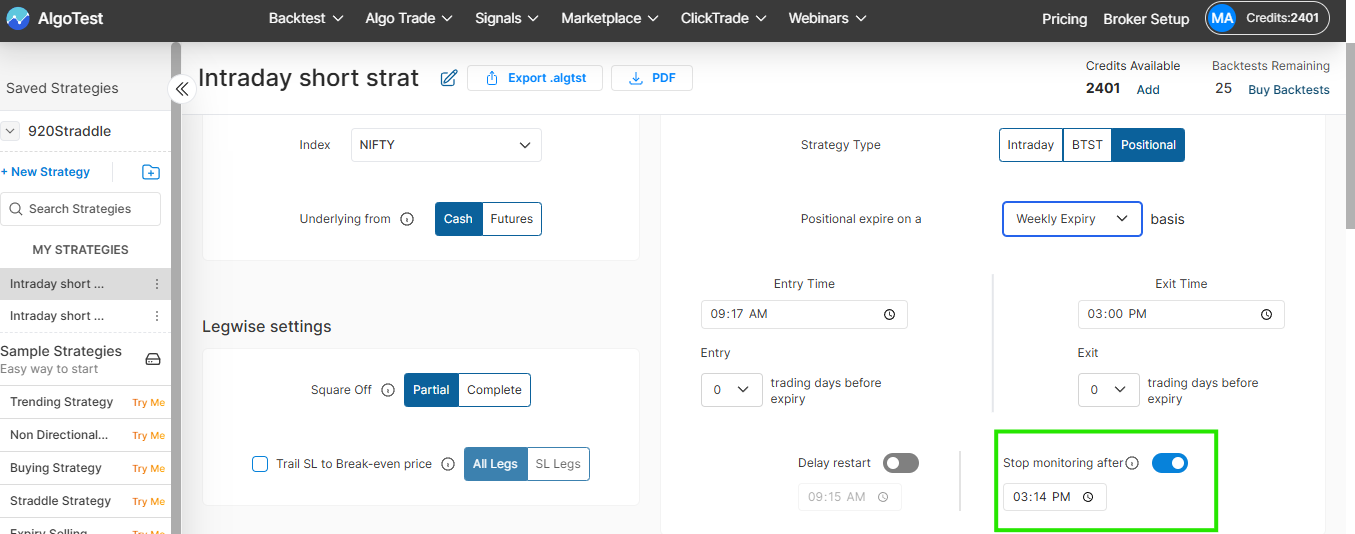
The Stop Monitoring After feature lets you set a time after which AlgoTest will stop actively monitoring your strategy for the rest of the day.
Once the selected time is reached:
-
All pending entry and exit orders are cancelled.
-
No new entries or re-entries are triggered.
-
Stop-loss and target conditions are no longer checked.
-
Any open position remains unchanged.
-
The open position will still close normally at your configured Exit Time.
This feature can help prevent unwanted triggers caused by unusual option price movements during the Closing Auction Session (CAS).
Important: Stop Monitoring After does not close an open position. It only stops further strategy monitoring. Use Exit Time to define when an open position should be closed.
The feature is available for Intraday, BTST, and Positional strategies in both Backtesting and Algo Execution.