Trade Signals
Trade Signals on AlgoTest allows you to directly take trades by simply sending a webhook alert from any platform like TradingView. Whether you're trading in Stocks, Futures, or Options, you can now trigger exact trades without pre-defining them in a strategy.
This feature is perfect for advanced traders who want full control over their trades using their own alerts.
How It Works
With Trade Signals, you don’t need to create a separate leg or define a stock in advance.
Instead, you:
- Create a signal on AlgoTest
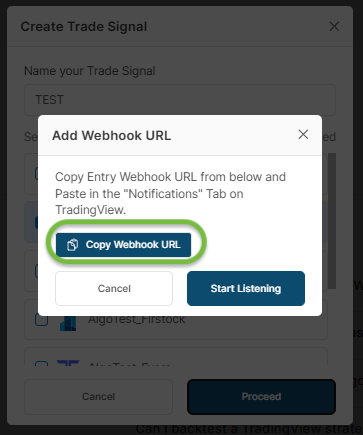
- Copy the webhook URL
- Paste it in your TradingView alert
- Define your trade directly in the alert message
That’s it. AlgoTest will take the trade automatically when the alert is triggered!
Trade Message Format (What You Send in Alert)
You just write the trade in a simple format:
[Ticker] [buy/sell] [Quantity]
Example:
INFY buy 10
INFY1! sell 4
NIFTY250417C23000 buy 1
NIFTY250417P23000 sell 2, NIFTY250417C23000 sell 2
- AlgoTest will read this alert and place the correct orders.
- You can even send multiple trades in one alert, separated by commas.
Supported Formats
-
Cash Market:
INFY→ Infosys equity stock -
Futures (Current Month):
INFY1!→ Infosys Futures (Front Month) -
Futures (Next Month):
INFY2!→ Infosys Futures (Next Month) -
Options:
NIFTY250417C23000→ NIFTY Call Option, expiry 17-Apr-2025, strike 23000
Cis for Call,Pis for Put
User Flow: Setup in 5 Minutes
1. Create a New Trade Signal on AlgoTest
- Go to AlgoTest > Signals Dashboard:
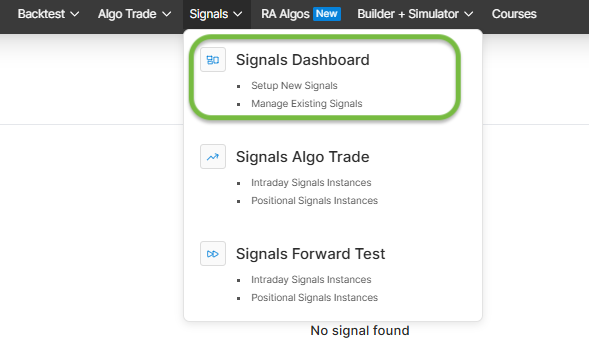
- Go to Trade Signals:
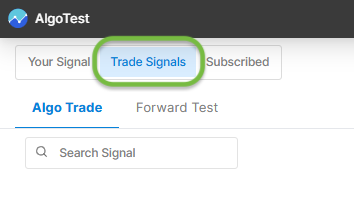
- Click "Create New Signal" :
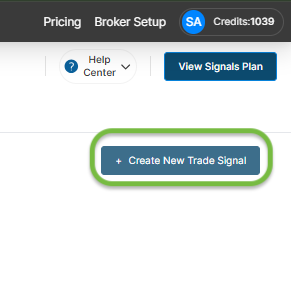
- Choose between Forward Test or Algo Trading:
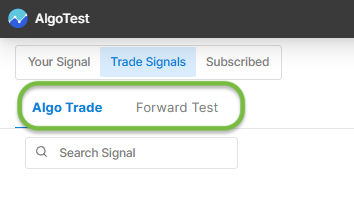
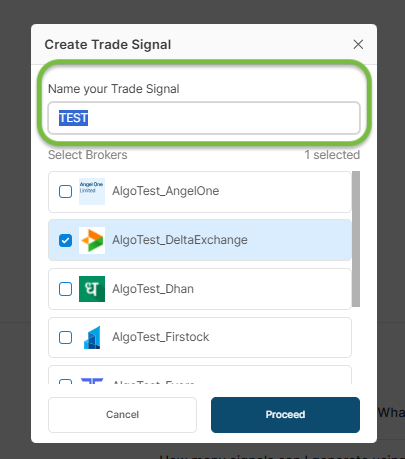
- Give it a name:
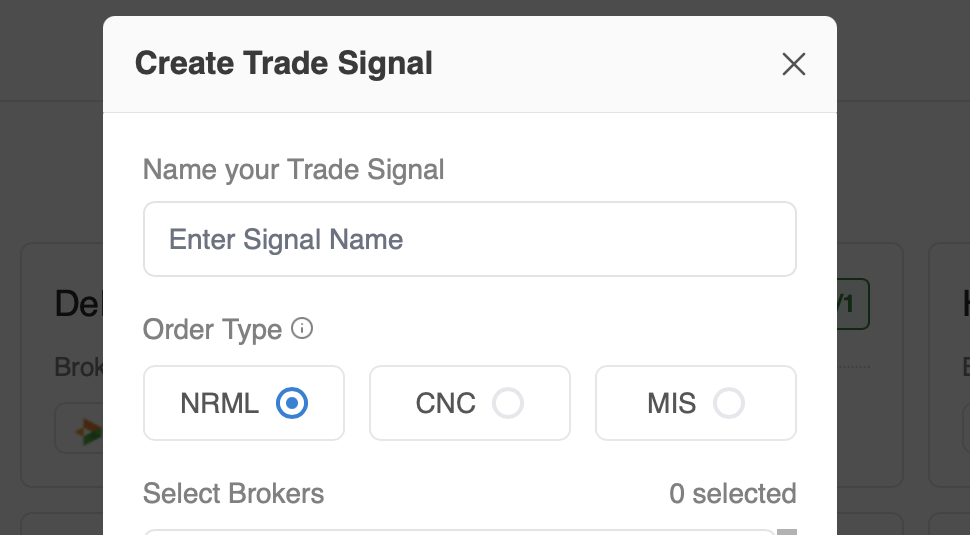
- You can now select the order type:
- Copy the Webhook URL:
2. Paste the Webhook in Your Alert Platform (e.g., TradingView)
- Go to your TradingView alert
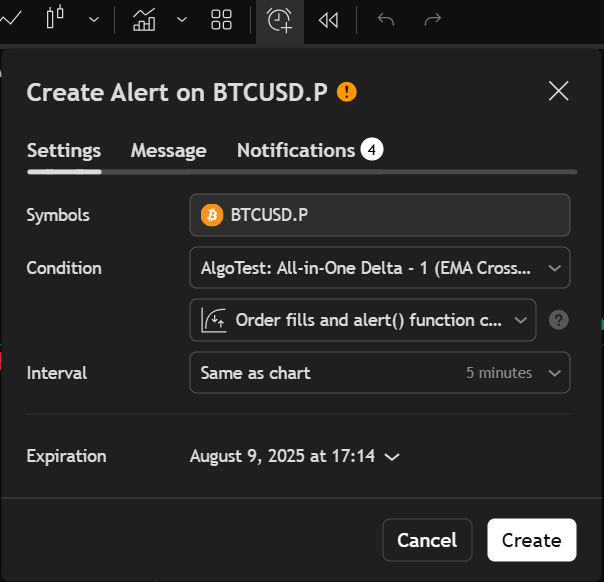
- Paste the Webhook URL in the designated field
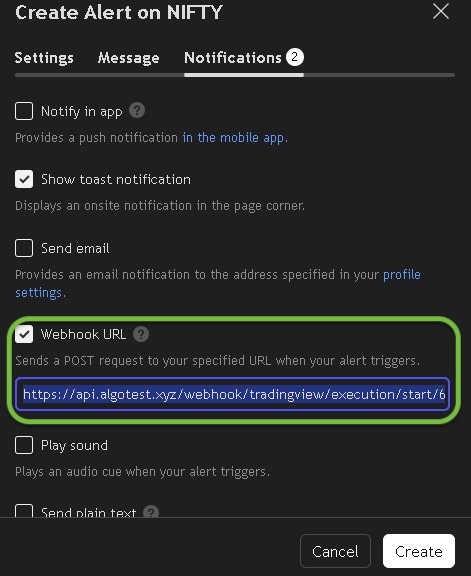
- Enter your trade message (like the examples above) in the alert message box
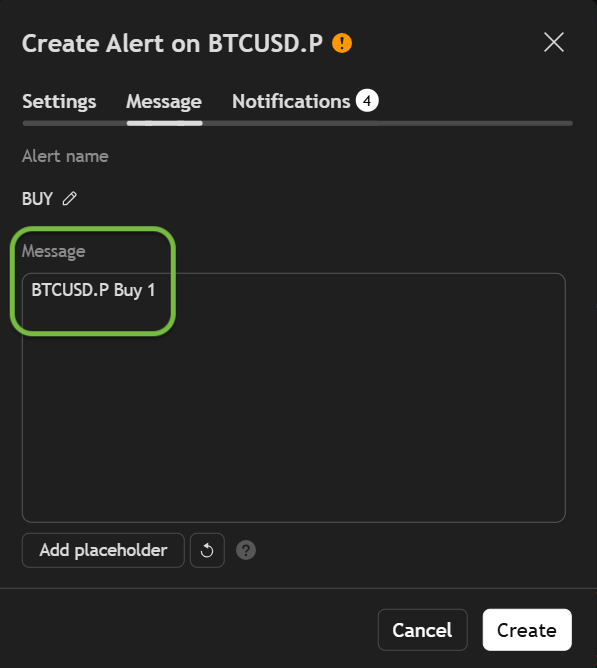
Now you’re ready to go! When your alert triggers, AlgoTest executes the trade.

Forward Test vs Live Trade
- Forward Test: Simulates trade execution without placing real orders. Great for testing.
- Live Trade: Executes actual trades via your broker. Make sure your broker is connected.
Broker Integration
AlgoTest supports 45+ brokers.
To start trading:
- Connect your broker in AlgoTest settings
- Create your signal in Algo Trade
- Your next alert will place a real order
Order Type:
Order types determine how long a position can be held, whether it will be squared off automatically, and how much margin is required. Selecting the correct order type ensures the position behaves as intended.
MIS (Margin Intraday Square-off)
Purpose: Intraday trading
Holding Period: Same trading day only
Margin Requirement: Lower margin due to intraday leverage
Square-off: Auto square-off before market close
When to use:
- Intraday strategies in equities, futures, or options (where supported)
- Trades not intended to be carried overnight
CNC (Cash & Carry)
Purpose: Delivery-based equity trading
Holding Period: Unlimited
Margin Requirement: Full payment; no leverage
Square-off: No auto square-off
When to use:
- Buying shares for delivery to the demat account
- Long-term or short-term investing
NRML (Normal)
Purpose: Carry-forward F&O trading
Holding Period: Allowed to hold overnight and until expiry
Margin Requirement: Requires full overnight margin; no intraday leverage
Square-off: No auto square-off (except on expiry as per exchange rules)
When to use:
- Futures and options positions intended for multi-day or overnight holding
- Positional strategies, spreads, and hedged trades
Important Notes
- Supports only stocks and F&O-enabled instruments
- Up to 8 trades per alert
- Works across Cash, Futures, and Options segments
- No need to define legs or instruments in advance, alerts control everything
Managing Trades: Square Off All & Add External Trades
Once a signal is live, you can manage its open positions directly from the Signals View Trades panel.
Square off all (SQ All)
Square off all (SQ All) lets you square off every open position for a signal in a single click, instead of closing each one manually.
Steps to use SQ All:
- Go to the Signals section from the main menu.
- Select the relevant signal.
- Click View Trades to see all open positions.
- Click Square off all (SQ All).
- Confirm the action in the pop-up to square off all open positions for that signal at once.
Add External Trades
Add External Trades lets you attach a trade you took manually on your broker (at your own price and quantity) to a signal, so its P&L is analysed based on that entry. You manage it from the same View Trades panel, alongside the signal's other legs.
Steps to use Add External Trades:
- In the View Trades panel, click Add External Trade.
- Fill in Broker, Underlying, Instrument Type, Expiry, Strike, Option Type, Position, Lots, and Price, then click Add Trade.
This is useful when you've traded manually on your broker and want that trade tracked alongside the signal. You can square it off, or delete it, from the same panel.
Important: Adding or deleting trades within Signals View Trades does not affect your actual broker account positions - it's solely for tracking and management within AlgoTest's interface.
Need Help?
- Telegram Support: Join our group